StrategyQuant
Q AI AssistantAlgoCloudQuantAnalyzerQuantDataManager
Free CourseCompany
BlogDocumentationForumContact us
BlogMarketplace
Log in
Create free account

Product

  • Pricing & licenses
  • Learn
  • Marketplace
  • Start free trial

Legal

  • Terms of Service
  • Privacy Policy
  • Cookies

Contact

[email protected]

Company

StrategyQuant s.r.o.

Korunní 2569/108, Vinohrady, 101 00 Praha 10, Czech Republic, EU

IČ: 04000498

DIČ: CZ04000498

Social

  • Legal Notice | PROCESSING AND PROTECTION OF PERSONAL DATA

    Past performance is no guarantee of future success. All information should be viewed as educational only

    UNITED STATES Disclaimer required by Government - Commodity Futures Trading Commission informs: Futures and options trading have great potential rewards, but also great potential risk. You must be aware of the risks and be willing to accept them in order to invest in the futures and options markets. Don't trade with money you can't afford to lose. This is neither a solicitation nor an offer to buy/sell futures, shares or options on the same. No representation is being made that any account will or is likely to realise profits or losses similar to those discussed in this document. The past performance of any trading system or methodology is not necessarily indicative of future results.

    CFTC RULE 4.41 - HYPOTHETICAL OR SIMULATED PERFORMANCE RESULTS HAVE CERTAIN LIMITATIONS. UNLIKE A RECORD OF ACTUAL PERFORMANCE, SIMULATED RESULTS DO NOT REPRESENT ACTUAL TRADING. ALSO, SINCE THE TRADES WERE NOT EXECUTED, THE RESULTS MAY HAVE OFFSET THE IMPACT, IF ANY, OF CERTAIN MARKET FACTORS, SUCH AS LACK OF LIQUIDITY. SIMULATED TRADING PROGRAMMES IN GENERAL ARE ALSO SUBJECT TO THE FACT THAT THEY ARE DESIGNED WITH THE BENEFIT OF HINDSIGHT. NO REPRESENTATION IS BEING MADE THAT ANY ACCOUNT WILL OR IS LIKELY TO REALISE PROFITS OR LOSSES SIMILAR TO THOSE SHOWN.

    NO REPRESENTATION IS BEING MADE THAT ANY ACCOUNT WILL, OR IS LIKELY TO, REALISE PROFITS OR LOSSES SIMILAR TO THOSE DISCUSSED WITHIN THIS SITE. IF YOU DECIDE TO INVEST REAL MONEY, ALL TRADING DECISIONS IN THE FINANCIAL MARKETS SHOULD BE YOUR OWN.

    © StrategyQuant 2026

    Powered by Klaudie.ai

    Back to marketplaceDIGITAL

    Select Best Strategies by Entry Group

    StrategyQuantPlugins
    Select Best Strategies by Entry Group

    Groups strategies by entry indicators and selects the top N per group using configurable criteria. Useful for filtering large databanks to keep only the best strategies per entry indicator combination.

    Aquí el artículo actualizado con el tercer argumento:

    Select Best Strategies by Entry Indicators Group with Arguments

    Description

    This custom analysis snippet processes a databank and automatically selects the best N strategies from each group of strategies that share the same Entry Indicators combination.

    It is useful when you have a large databank with many strategies built from similar building blocks. Instead of manually comparing them, this snippet groups them by their entry conditions and keeps only the top N strategies from each group, ranked by a configurable scoring criterion.

    How it works

    The snippet uses the built-in Entry Indicators databank column to identify which indicators each strategy uses in its entry conditions. Strategies that share exactly the same entry indicators are considered part of the same group. Within each group, strategies are ranked by the selected criterion and the top N are selected as winners.

    All winning strategies are copied to the Target databank. The Source databank remains untouched.

    Requirements

    No additional snippets are required. All dependencies are available in the standard SQX installation.

    Setup instructions

    1. Copy the code below into a new Custom Analysis snippet in CodeEditor and name it SelectBestByEntryGroupArgs
    2. Compile the snippet
    3. Create a new Custom Project
    4. Add a new task of type Custom Analysis
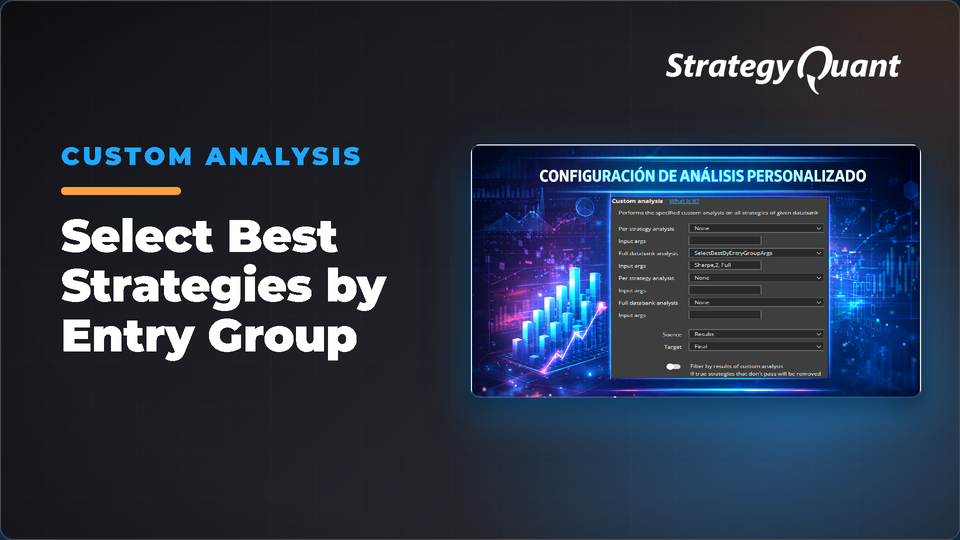
    5. In the task configuration, set Full databank analysis to SelectBestByEntryGroupArgs
    6. Set your Source databank (the one containing all your strategies)
    7. Set your Target databank (where the winners will be copied)
    8. Make sure the toggle Filter by results of custom analysis is disabled
    9. Optionally configure the Input args field (see below)
    10. Run the project

    Input args

    The snippet accepts three optional parameters separated by commas: the scoring criterion, the number of top strategies to select per group (minimum 1, maximum 10), and the sample type to use for calculations.

    Format: Criterion,N,Sample

    Examples:

    • (empty) — 1 best strategy per group, Ret/DD Ratio, Full Sample (all defaults)
    • RetDD — 1 best per group by Ret/DD Ratio, Full Sample
    • RetDD,3 — 3 best per group by Ret/DD Ratio, Full Sample
    • RetDD,3,IS — 3 best per group by Ret/DD Ratio, In Sample
    • Sharpe,5,OOS — 5 best per group by Sharpe Ratio, Out of Sample
    • Calmar,10,Full — 10 best per group by Calmar Ratio, Full Sample

    Available criteria:

    • RetDD — Ret/DD Ratio (default)
    • Sharpe — Sharpe Ratio
    • ProfitFactor — Profit Factor
    • NetProfit — Net Profit (absolute)
    • Calmar — Calmar Ratio
    • WinRate — Percentage of winning trades
    • Drawdown — Lowest absolute drawdown (lower is better)

    Available sample types:

    • Full — Full Sample (default if omitted)
    • IS — In Sample
    • OOS — Out of Sample

    Example

    If your Source databank contains 42 strategies distributed across 17 different Entry Indicators combinations, and you set the Input args to RetDD,2,OOS, after running the snippet your Target databank will contain up to 34 strategies — the 2 best by Ret/DD Ratio calculated on Out of Sample data from each group. Groups with only one strategy will contribute just one.

    Code

    Code in the header of the article.

    Disclaimer

    This snippet is provided for educational and research purposes only. It does not constitute financial advice or a recommendation to trade any financial instrument. Past performance of any strategy selected by this tool is not indicative of future results. Use at your own risk. Always validate results independently before using any strategy in live trading.

    Thanks for following along. See you in the next build.
    José Carlos

    Past performance is no guarantee of future success. All information should be viewed as educational only UNITED STATES Disclaimer required by Government - Commodity Futures Trading Commission informs: Futures and options trading have great potential rewards, but also great potential risk. You must be aware of the risks and be willing to accept them in order to invest in the futures and options markets. Don't trade with money you can't afford to lose. This is neither a solicitation nor an offer to buy/sell futures, shares or options on the same. No representation is being made that any account will or is likely to realise profits or losses similar to those discussed in this document. The past performance of any trading system or methodology is not necessarily indicative of future results. CFTC RULE 4.41 - HYPOTHETICAL OR SIMULATED PERFORMANCE RESULTS HAVE CERTAIN LIMITATIONS. UNLIKE A RECORD OF ACTUAL PERFORMANCE, SIMULATED RESULTS DO NOT REPRESENT ACTUAL TRADING. ALSO, SINCE THE TRADES WERE NOT EXECUTED, THE RESULTS MAY HAVE OFFSET THE IMPACT, IF ANY, OF CERTAIN MARKET FACTORS, SUCH AS LACK OF LIQUIDITY. SIMULATED TRADING PROGRAMMES IN GENERAL ARE ALSO SUBJECT TO THE FACT THAT THEY ARE DESIGNED WITH THE BENEFIT OF HINDSIGHT. NO REPRESENTATION IS BEING MADE THAT ANY ACCOUNT WILL OR IS LIKELY TO REALISE PROFITS OR LOSSES SIMILAR TO THOSE SHOWN. NO REPRESENTATION IS BEING MADE THAT ANY ACCOUNT WILL, OR IS LIKELY TO, REALISE PROFITS OR LOSSES SIMILAR TO THOSE DISCUSSED WITHIN THIS SITE. IF YOU DECIDE TO INVEST REAL MONEY, ALL TRADING DECISIONS IN THE FINANCIAL MARKETS SHOULD BE YOUR OWN.
    Free

    Files

    • Snippet-SelectBestStrategiesbyEntryGroup.sqm9 KBLocked

    Download unlocks after purchase or with an active tier.

    Details
    Version1.0.0
    PublishedOctober 19, 2026
    Last updatedNovember 2, 2026
    AppSQ
    TypeSnippet
    AuthorPepe
    App version145.3058
    Codebase categoryCustom Analysis