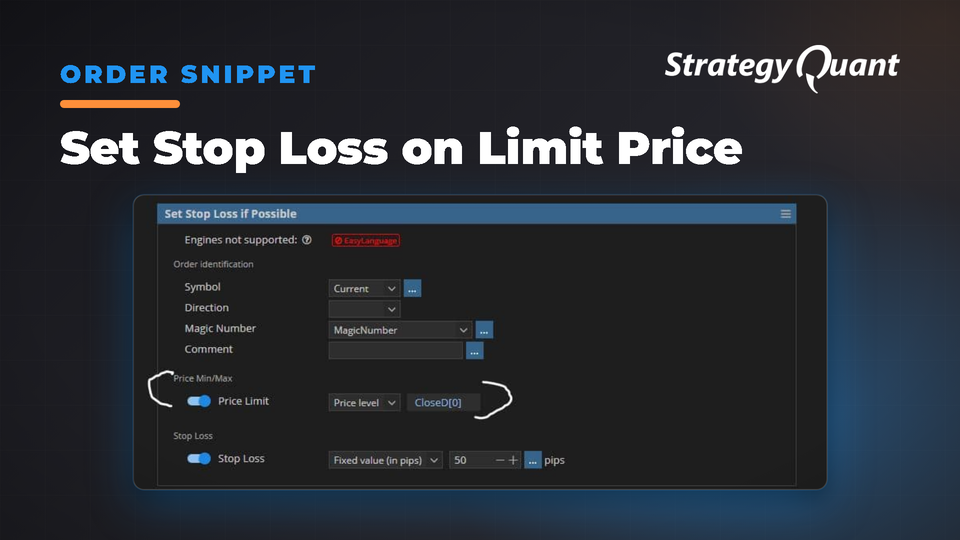
Définit automatiquement le stop loss uniquement lorsque les prix d’ouverture franchissent des seuils définis, évitant ainsi de placer un stop loss sur des positions perdantes lors de la gestion de plusieurs positions ouvertes.
Définit le Stop Loss à un niveau spécifié si le prix d’ouverture de l’ordre est supérieur (pour une position longue) ou inférieur (pour une position courte) à une limite de prix.
Si vous avez plusieurs positions ouvertes, cela évitera de placer un stop loss sur les positions perdantes. Ce qui pourrait clôturer immédiatement la position
Voici le code :
package SQ.Blocks.Order.Modify;
import SQ.Functions.OrderFunctions;
import SQ.Internal.ActionBlock;
import com.strategyquant.lib.*;
import com.strategyquant.datalib.*;
import com.strategyquant.tradinglib.*;
// Modified in France by Emmanuel Evrard for the StrategyQuantX Community :)
@BuildingBlock(name="(SLI) Set Stop Loss if Possible", display="Set Stop Loss if Possible", returnType = ReturnTypes.Action)
@Help("Sets Stop Loss to a specified level if the openPrice order is above (for long position) or below (for short position) a price Limit. If SL already exists it will be moved.")
@SortOrder(400)																					// In AlgoWizard, this is a dropbox position (400 or 500 or 600 etc.) of this function in the menu of "Add New Condition", you may have to adjust it depending on the function already installed on the same dropbox.
@CategoryOrder(200)
@IgnoreInBuilder
@NotSupportedFor(engines="EL")
public class SetStopLossIfPossible extends ActionBlock
{
    @Parameter(defaultValue="Current", category="Order identification", showIfDefault=false, allowAny=true)
    public String Symbol;
    @Parameter(defaultValue="0", category="Order identification", showIfDefault=false)
    @Editor(type=Editors.Selection, values="Long=1,Short=-1")
    public int Direction;
    @Parameter(defaultValue="MagicNumber", category="Order identification", showIfDefault=false)
    @Help("Magic number that can identify the order.")
    @Editor(type=Editors.SelectionVariablesWithAny)
    public int MagicNumber;
    @Parameter(defaultValue="", category="Order identification", showIfDefault=false)
    @Help("Comment can be also used to identify the order. In case of Comment, order matches if the order comments contains the text specified here.")
    public String Comment;
    @Parameter(category="Price Min/Max")
    @Help("Price limit of order, only Long Order with higher Open Price will be selected or only Short Order with lower Open price will be selected")
    @Editor(type=Editors.Formula, formulaName="RangeLevel")
    public IFormula PriceLimit;
    @Parameter(category="Stop Loss")
    @Editor(type=Editors.Formula, formulaName="RangeLevel")
    public IFormula StopLoss;
    //------------------------------------------------------------------------
    //------------------------------------------------------------------------
    //------------------------------------------------------------------------
    @Override
    public void OnAction() throws TradingException
    {
        for(int i=0; i<Strategy.Trader.getOpenOrdersCount(false); i++)
        {
            ILiveOrder order = Strategy.Trader.getOpenOrder(i, false);
            double openPrice = order.isNettingMode() ? order.getLastOpenPrice() : order.getOpenPrice();
            if(OrderFunctions.identify(order, Strategy, Symbol, Direction, MagicNumber, Comment))
            {
                if (Direction != 1 && openPrice >= PriceLimit.evaluateFormula(Strategy, Symbol, openPrice, Direction))
                {
                    double sl = StopLoss.evaluateFormula(Strategy, Symbol, openPrice, Direction);
                    order.setSL(sl).Send();
                }
                if (Direction != -1 && openPrice <= PriceLimit.evaluateFormula(Strategy, Symbol, openPrice, Direction))
                {
                    double sl = StopLoss.evaluateFormula(Strategy, Symbol, openPrice, Direction);
                    order.setSL(sl).Send();
                }
            }
        }
    }
}
Gratuit
Fichiers
Snippet-SetStopLossonLimitPrice.sqm5 KBVerrouillé
Le téléchargement se débloque après l’achat ou avec un niveau actif.