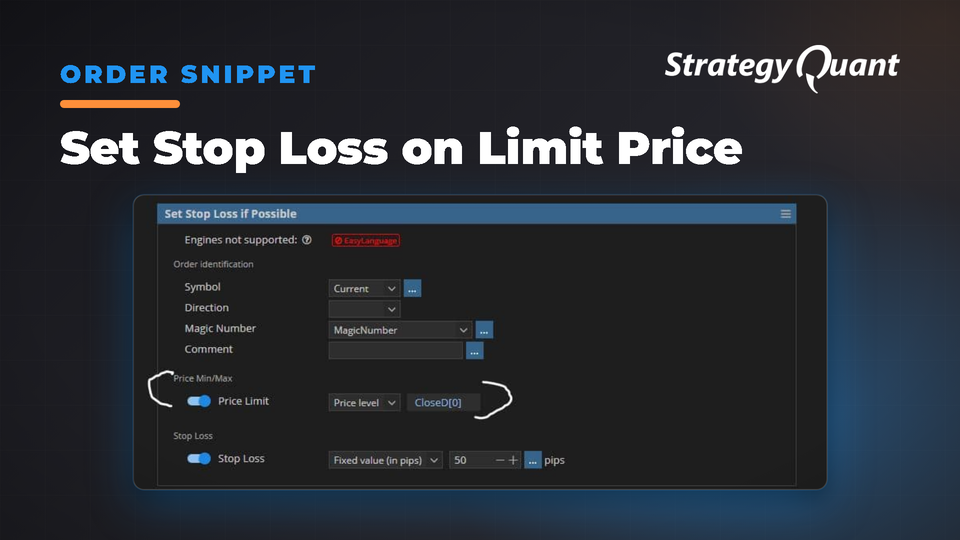
Setzt einen Stop-Loss automatisch erst dann, wenn die Eröffnungspreise definierte Schwellenwerte erreichen. So wird verhindert, dass bei der Verwaltung mehrerer offener Trades ein Stop-Loss für Verlustpositionen platziert wird.
Setzt den Stop Loss auf ein bestimmtes Niveau, wenn der Eröffnungspreis der Order über (für Long-Positionen) oder unter (für Short-Positionen) einem Preislimit liegt.
Wenn Sie mehrere offene Positionen haben, wird dadurch vermieden, dass ein Stop-Loss für Verlustpositionen gesetzt wird. Dies könnte die Position andernfalls sofort schließen
Hier ist der Code:
package SQ.Blocks.Order.Modify;
import SQ.Functions.OrderFunctions;
import SQ.Internal.ActionBlock;
import com.strategyquant.lib.*;
import com.strategyquant.datalib.*;
import com.strategyquant.tradinglib.*;
// Modified in France by Emmanuel Evrard for the StrategyQuantX Community :)
@BuildingBlock(name="(SLI) Set Stop Loss if Possible", display="Set Stop Loss if Possible", returnType = ReturnTypes.Action)
@Help("Sets Stop Loss to a specified level if the openPrice order is above (for long position) or below (for short position) a price Limit. If SL already exists it will be moved.")
@SortOrder(400)																					// In AlgoWizard, this is a dropbox position (400 or 500 or 600 etc.) of this function in the menu of "Add New Condition", you may have to adjust it depending on the function already installed on the same dropbox.
@CategoryOrder(200)
@IgnoreInBuilder
@NotSupportedFor(engines="EL")
public class SetStopLossIfPossible extends ActionBlock
{
    @Parameter(defaultValue="Current", category="Order identification", showIfDefault=false, allowAny=true)
    public String Symbol;
    @Parameter(defaultValue="0", category="Order identification", showIfDefault=false)
    @Editor(type=Editors.Selection, values="Long=1,Short=-1")
    public int Direction;
    @Parameter(defaultValue="MagicNumber", category="Order identification", showIfDefault=false)
    @Help("Magic number that can identify the order.")
    @Editor(type=Editors.SelectionVariablesWithAny)
    public int MagicNumber;
    @Parameter(defaultValue="", category="Order identification", showIfDefault=false)
    @Help("Comment can be also used to identify the order. In case of Comment, order matches if the order comments contains the text specified here.")
    public String Comment;
    @Parameter(category="Price Min/Max")
    @Help("Price limit of order, only Long Order with higher Open Price will be selected or only Short Order with lower Open price will be selected")
    @Editor(type=Editors.Formula, formulaName="RangeLevel")
    public IFormula PriceLimit;
    @Parameter(category="Stop Loss")
    @Editor(type=Editors.Formula, formulaName="RangeLevel")
    public IFormula StopLoss;
    //------------------------------------------------------------------------
    //------------------------------------------------------------------------
    //------------------------------------------------------------------------
    @Override
    public void OnAction() throws TradingException
    {
        for(int i=0; i<Strategy.Trader.getOpenOrdersCount(false); i++)
        {
            ILiveOrder order = Strategy.Trader.getOpenOrder(i, false);
            double openPrice = order.isNettingMode() ? order.getLastOpenPrice() : order.getOpenPrice();
            if(OrderFunctions.identify(order, Strategy, Symbol, Direction, MagicNumber, Comment))
            {
                if (Direction != 1 && openPrice >= PriceLimit.evaluateFormula(Strategy, Symbol, openPrice, Direction))
                {
                    double sl = StopLoss.evaluateFormula(Strategy, Symbol, openPrice, Direction);
                    order.setSL(sl).Send();
                }
                if (Direction != -1 && openPrice <= PriceLimit.evaluateFormula(Strategy, Symbol, openPrice, Direction))
                {
                    double sl = StopLoss.evaluateFormula(Strategy, Symbol, openPrice, Direction);
                    order.setSL(sl).Send();
                }
            }
        }
    }
}
Kostenlos
Dateien
Snippet-SetStopLossonLimitPrice.sqm5 KBGesperrt
Der Download wird nach dem Kauf oder mit einem aktiven Tier freigeschaltet.